Bash Almanac
Introduction
The Bash Almanac is a reference for building practical GNU Bash shell scripts. It provides reusable functions and examples for creating robust command-line tools and interactive CLI programs. All examples are tested under Linux and macOS. The snippets are self-contained and can be copied directly into your own scripts.
Topics include:
-
Prompting and validating user input.
-
Generating color output compatible with Linux console and terminals.
-
Drawing text boxes using Unicode line-drawing characters.
-
Advanced parsing of command-line options and arguments.
-
Other features commonly used in advanced CLI scripts.
All examples are tested under Linux and macOS. The snippets are self-contained and can be copied directly into your own scripts.
Colors and Styles
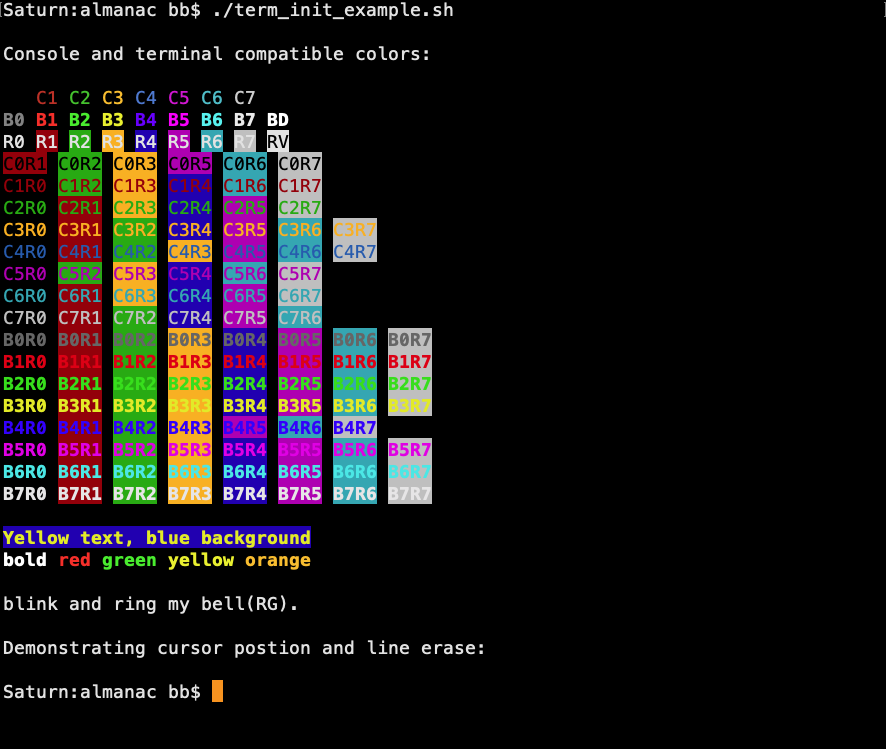
The term_init function defines reusable foreground and background color variables, cursor movement sequences, and additional terminal control sequences.
It adjusts the terminal color palette, adding colors such as orange to improve visibility and maintain compatibility across Linux VGA consoles, SSH sessions, and modern terminal emulators.
term_init also provides a demo mode to display all available color options and a cleanup mode that restores the original shell environment if the script is source-executed.
function term_init {
  #
  # Assign useful terminal sequences that are compatible with any
  # 256-color VGA terminal, if available. There is, however, no
  # ill-effect if the terminal does not - in which case variables
  # will simply be empty and produce no output. Requires Bash >= 3.
  #
  # Usage:
  #   term_init         : Create variables.
  #   term_init demo    : Demonstrate (verify).
  #   term_init cleanup : Remove variables if source exectued.
  #
  # Define arrays of variable names and appropriate tput arguments.
  local -a tput_fg=( 'C0:setaf 0' 'C1:setaf 1' 'C2:setaf 2' 'C3:setaf 3'
                     'C4:setaf 4' 'C5:setaf 5' 'C6:setaf 6' 'C7:setaf 7' )
  local -a tput_bfg=( 'B0:setaf 0' 'B1:setaf 1' 'B2:setaf 2' 'B3:setaf 3'
                      'B4:setaf 4' 'B5:setaf 5' 'B6:setaf 6' 'B7:setaf 7' )
  local -a tput_bg=( 'R0:setab 0' 'R1:setab 1' 'R2:setab 2' 'R3:setab 3'
                     'R4:setab 4' 'R5:setab 5' 'R6:setab 6' 'R7:setab 7' )
  local -a tput_misc=( 'BD:bold' 'RG:bel' 'BL:blink' 'T0:sgr0' 'U1:cuu1'
                       'RV:rev' 'ED:ed' 'EL:el' 'HC:civis' 'RC:cnorm' )
  local i i1 i2
  #
  case "$1" in
    demo)
      echo -e "\nConsole and terminal compatible colors:\n"
      for i in "${tput_fg[@]}" "${tput_bfg[@]}" BD "${tput_bg[@]}" RV; do
        i1="${i%:*}"
        echo -n "${!i1}$i1${T0} "
        case $i1 in C7|BD|RV) printf "\n";; esac
      done
      for i1 in "${tput_fg[@]}"; do
        i1="${i1%:*}"
        for i2 in "${tput_bg[@]}"; do
          i1="${i1%:*}" i2="${i2%:*}"
          [[ ${i1#C} == ${i2#R} ]] && continue
          case $i1$i2 in C6R2|C2R6|C5R1|C1R5|C7R3|C0R4) continue;; esac
          echo -n "${!i1}${!i2}$i1$i2${T0} "
        done; echo
      done
      for i1 in "${tput_bfg[@]}"; do
        for i2 in "${tput_bg[@]}"; do
          i1="${i1%:*}" i2="${i2%:*}"
          case $i1$i2 in B3RV|B4R4) continue;; esac
          echo -n "${!i1}${!i2}$i1$i2${T0} "
        done; echo
      done
    ;;
    cleanup)
      # Remove variables defined by term_init. This is useful to clean up
      # the shell (ENV) if term_init was source executed.
      # script has been source executed.
      local -a all=( "${tput_fg[@]}" "${tput_bfg[@]}" "${tput_bg[@]}"
                     "${tput_misc[@]}" )
      for i in "${all[@]}"; do unset "${i%:*}"; done
      # Restore default Linux 16-color terminal palette and $TERM.
      if [[ "${TERM}" == linux ]]; then
        setvtrgb vga
      elif [[ -n ${TERM_INIT_OLD_TERM} ]]; then
        export TERM="${TERM_INIT_OLD_TERM}"
        unset TERM_INIT_OLD_TERM
      fi
      unset -f term_init
    ;;
    *)
      # Define variables that produce the same or similar color output
      # under Linux VGA-style 16-color (console, TERM=linux) and terminal
      # emulators (SSH, xterm-256color).
      for i in "${tput_fg[@]}" "${tput_bg[@]}" "${tput_misc[@]}"; do
        printf -v "${i%:*}" '%s' "$(tput ${i#*:} 2>/dev/null)"
      done
      # Bright colors, add bold.
      for i in "${tput_bfg[@]}"; do
        printf -v "${i%:*}" '%s' "${BD}$(tput ${i#*:} 2>/dev/null)"
      done
      # Alter the Linux console color map to replace dark yellow with a
      # more visible orange, thereby providing an additional color and
      # improving compatiblity with modern terminal emulation.
      # Note that bold orange (BD+C3) becomes bright yellow.
      if [[ "${TERM}" == linux ]]; then
        # Match Linux console and xterm-256 colors.
        echo "0,170,0,255,0,170,0,192,85,255,85,255,85,255,85,255
              0,0,170,199,0,0,170,192,85,85,255,255,85,85,255,255
              0,0,0,6,176,170,170,192,85,85,85,85,255,255,255,255" \
              | setvtrgb -
      else
        # Any SSH client/terminal worth mentioning supports xterm-256color.
        # Some installations may not be configured properly. Nevertheless,
        # restore the original TERM value when running term_init cleanup.
        # Override default orange and blue to match Linux console colors.
        TERM_INIT_OLD_TERM="${TERM}"
        export TERM=xterm-256color
        C3=$(tput setaf 214)  # Orange
        R3=$(tput setab 214)  # Orange background
        C4=$(tput setaf 25)   # Blue
      fi
    ;;
  esac
}
Boxes and Borders
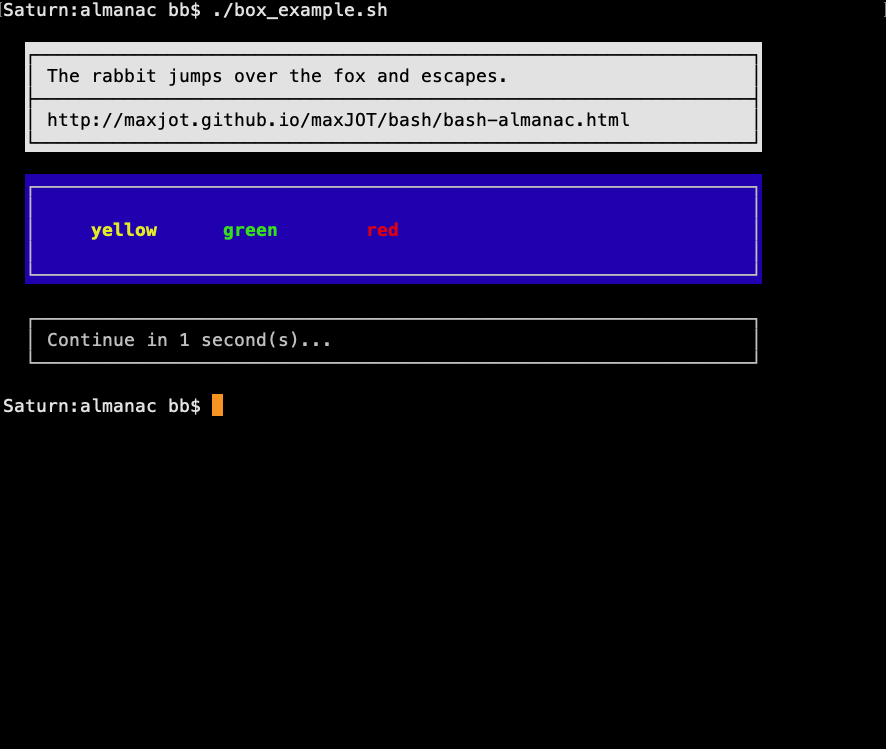
The box function generates text boxes using box-drawing characters, optional color schemes, and flexible line formatting modes. These are useful for displaying messages that require special user attention.
The function draws the box line by line and overlays the desired text, giving the user full control over the final appearance. Long lines can be split manually to match the preferred console width or programming style.
The companion mute function can suppress keyboard echo and disable control-key functions that might otherwise interfere with screen rendering.
function mute {
  # Optional feature to suppress keyboard and cursor output
  # when it can interfere with proper box and content rendering.
  #
  # $1 on:  Hide cursor, disable terminal echo, disable CTRL/C/D/Z.
  #         Stop user/keyboard interference while rendering screen output.
  # $1 off: Restore previously saved terminal state.
  #
  local hc=$( tput civis ); local rc=$( tput cnorm )
  #
  case $1 in
   on) sav_0=$( stty -g </dev/tty )  # Save tty settings. Global scope.
       stty -echo -icanon susp '?' intr '?' eof '?' </dev/tty
       printf ${hc} ;;
   off) stty ${sav_0} </dev/tty
        printf ${rc} ;;
  esac
}

function box {
  # $1 = Color scheme.
  # $2 = Text.
  # $3 = Format (optional):
  #      0 = standard newline (default).
  #      1 = do not move the cursor.
  #      2 = move the cursor to the beginning of the line (\r).
  # Example: box r --top
  #          box r "The rabbit jumps over the fox" 1
  #          box r "and escapes."
  #          box r --middle
  #          box r "https://maxjot.github.io/maxJOT/ref/boxes_and_borders"
  #          box r --bottom
  #
  # Note: lastarg_0 = global mutable.
  [[ -z ${lastarg_0} ]] && lastarg_0=0
  local maxlen background indent fb t0
  local box_top box_middle box_bottom box1 box2 box3 box4 box5 box6 box7 box8
  t0=$( tput sgr0 )
  maxlen=65
  box1='┌' box2='─' box3='┐' box4='│' box5='└' box6='┘' box7='├' box8='┤'
  # Generate horizontal line.
  box2=$( eval printf "${box2}%.0s" {1..${maxlen}} )
  # Generate top middle and bottom box-lines.
  box_top=$( printf "${box1}${box2}${box3}" )
  box_middle=$( printf "${box7}${box2}${box8}" )
  box_bottom=$( printf "${box5}${box2}${box6}" )
  # Used for white space with background.
  # printf -v background '%*s' ${maxlen} ''
  background=$( eval printf -- '\ %.0s' {1..${maxlen}} )
  # Set forground and background color.
  case $1 in
    4) fb=$( tput setaf 7; tput setab 4 ) ;; # white/blue
    0) fb=$( tput setaf 7; tput setab 0 ) ;; # black/white
    r) fb=$( tput rev ) ;; # Reverse
    *) fb= ;;      # No color
  esac
  indent="  ${fb}${box4}${t0}"
  if [[ "$2" == --top ]]; then
    printf "  ${fb}${box_top}${t0}\n"
    lastarg_0=0
  elif [[ "$2" == --bottom ]]; then
    printf "  ${fb}${box_bottom}${t0}\n"
    lastarg_0=0
  elif [[ "$2" == --middle ]]; then
    printf "  ${fb}${box_middle}${t0}\n"
    lastarg_0=0
  else
    # Insert indent depending on previous lastarg.
    case ${lastarg_0} in
      0) printf "   ${fb}${background}${box4}${t0}\r" ;;
      1) unset indent ;;
      2) ;;
      *) printf "   ${fb}${background}${box4}${t0}\r" ;;
    esac
    case "${3}" in
      0) printf "${indent}${fb} %s${t0}\n" "$2"
         lastarg_0=0 ;;
      1) printf "${indent}${fb} %s${t0}" "$2"
         lastarg_0=1 ;;
      2) printf "${indent}${fb} %s${t0}\r" "$2"
         lastarg_0=2 ;;
      *) printf "${indent}${fb} %s${t0}\n" "$2"
         lastarg_0=0 ;;
    esac
  fi
}
User Input Control
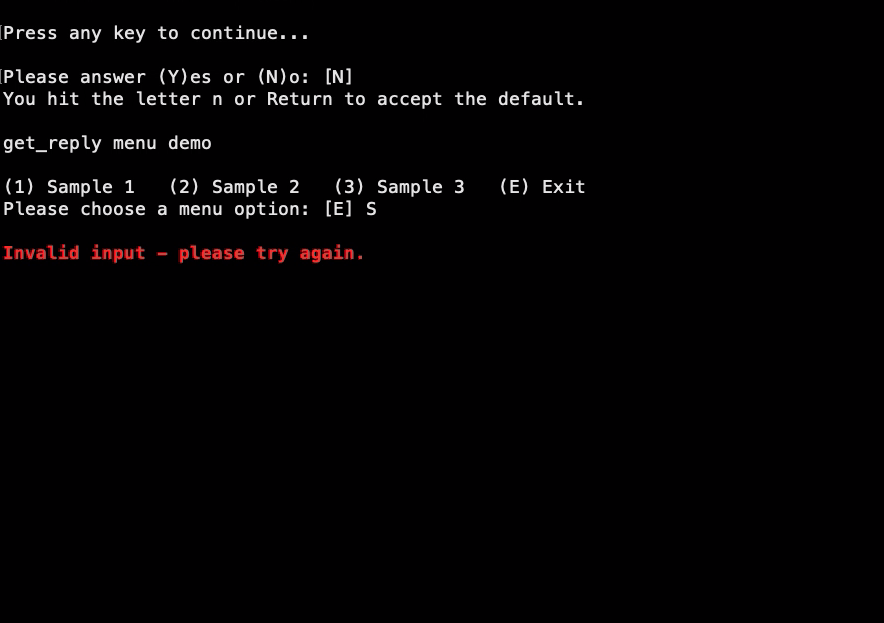
The get_reply function provides single-key user input with optional validation and default handling. When a list of valid options is supplied, the first item is automatically treated as the default and chosen if the user presses Return.
Invalid input is handled internally with automatic re-prompts and without visible screen redraw artifacts. The function returns the selected value via REPLY along with a meaningful exit status.
function get_reply {
  # Arguments:
  #   $1=prompt.
  #   $2=valid options (optional).
  # Output:
  #   $REPLY=option
  # Examples:
  #   get_reply "Press menu option:" "E 1 2 3 4"
  #   get_reply "Press any key to continue..."
  #   get_reply "Hit (y)es or (n)o, or (a)bort:" "Y N A"
  #
  # Note: $2 is optional. When specified, the first item
  # is automatically shown as the default answer. e.g. [E].
  # Any leading indentation in $1 automatically aligns the feedback.
  #
  # `read -t 0.1' causes an invalid timeout specification error
  # if not Bash 4 or later. Use 1 under Bash 3, which will still work
  # to flush the keyboard buffer, but cause a 1 second delay.
  #
  local tries=0 option prompt answer indent timeout
  local sav=$(stty -g </dev/tty)
  local hc=$(tput civis) rc=$(tput cnorm) u1=$(tput cuu1) ed=$(tput ed)
  local b1=$(tput bold; tput setaf 1) t0=$(tput sgr0)
  [[ ${BASH_VERSINFO:-0} -ge 4 ]] && timeout=0.1 || timeout=1
  # Restore cursor and cleanup prior to exiting the menu.
  opt_cleanup() {
    stty ${sav} </dev/tty; printf ${rc}; unset -f opt_msg opt_cleanup; }
  # Hide cursor, disable terminal echo, and show error message.
  opt_msg() {
    stty -echo </dev/tty; echo -e "${hc}\n${b1}$1${t0}"; sleep 1; }
  # Provide a dummy prompt when $1 is missing. Use any leading white
  # space when specified as indent, and align messages accordingly.
  if [[ -z $1 ]]; then
    prompt="?:"
  else
    indent=${1%%[!$' \t']*}
    prompt="$1"
  fi
  # Convert $2 to uppercase and make it an array for easier processing.
  # Adjust the prompt accordingly, using the first specified character
  # as default. Otherwise leave $1 as is (any key to continue).
  if [[ -n $2 ]]; then
    options=( $(printf '%s' "$2" | tr '[:lower:]' '[:upper:]') )
    default=${options[0]}
    prompt="$1 [${default}]"
  fi
  #
  while true; do
    # Flush the keyboard buffer.
    stty -icanon -echo </dev/tty
    read -r -t ${timeout:-0.1} -s --
    stty icanon echo </dev/tty # Set stdin to interactive mode.
    # Disable CTRL-D, CTRL-Z and CTRL-C (Requires read -e to function).
    stty susp '?' intr '?' eof '?' </dev/tty
    echo -en "${rc}${prompt}${ed}"
    # Read directly from the terminal when stdin is already
    # consumed by an outer while read loop or pipeline.
    read -r -e -n 1 -p " " answer </dev/tty 2>/dev/tty
    answer=$(printf '%s' "${answer}" | tr '[:lower:]' '[:upper:]')
    # No valid options = any key to continue.
    [[ -z ${2} ]] && { opt_cleanup; REPLY=${answer}; return 0; }
    # Apply default if the input is a Return.
    [[ -z ${answer} ]] && answer="${default}" # Default.
    for item in "${options[@]}"; do
      [[ "${answer}" == ${item} ]] \
         && { opt_cleanup; REPLY=${answer}; return 0; }
    done
    if (( tries++ == 2 )); then
      opt_msg "${indent}Aborting after 3 invalid answers."
      printf "\r${u1}${u1}${ed}"
      opt_cleanup
      return 3
    else
      opt_msg "${indent}Invalid input - please try again."
      printf "${u1}${u1}${u1}"
    fi
    stty ${sav} </dev/tty
  done
}
Arguments and Options
Parsing command-line arguments beyond simple flag handling can quickly become complex when options may be combined, repeated, supplied in arbitrary order, or require additional validation.
This implementation demonstrates structured command-line argument parsing in Bash. It is designed to be order-agnostic and user-friendly, allowing options and arguments to appear in any sequence while handling repeated option specifications without adverse effects.
The demonstration script serves as a practical reference that can be adapted, simplified, or extended according to application requirements. Rather than relying on a monolithic parsing loop, the implementation divides processing into distinct phases, each responsible for a specific aspect of validation or argument interpretation.
The parser consists of five processing phases:
Phase 1 |
Reject malformed long options (e.g. |
Phase 2 |
Parse simple short and long options, including combined short-option bundles.
Options may appear multiple times and in any order without adverse effects.
(e.g. |
Phase 3 |
Parse options that require an additional parameter, such as a number,
keyword, or filename (e.g. |
Phase 4 |
Parse stand-alone command-line arguments that are not associated with
options, such as filenames or internal keywords (e.g. |
Phase 5 |
Validate argument combinations, verify mandatory inputs, and execute actions associated with selected options. |
IAM=( ${BASH_SOURCE[0]##*/} 2.0 )

# Exit vs. return if source executed. Create a snapshot of
# variables and functions when source executed, so we can use
# this information later to restore the shell environment when
# executing the cleanup function.
#
if ( return 0 2>/dev/null ); then
  SOURCED=1
  ENV_VARIABLES=$( compgen -v )
  ENV_FUNCTIONS=$( compgen -A function )
else
  SOURCED=0
fi

function show_help {
  echo "Usage:
  ${IAM} [--install | --uninstall]
  ${IAM} [-h | --help | --version | --changelog]
  ${IAM} [-x <type>] [-d] [-v] <target> [-o <directory>]
  ${IAM} [-x <type>] [-d] [-v] [-t] <target>"
  echo
  echo "Options:
  -h, --help                 show this help screen
      --version              show version
      --changelog
      --install              install this program
      --uninstall            uninstall this program
  -d, --debug                debug mode
  -o, --outdir <directory>   write output to directory
  -t, --test                 test run (no output)
  -v, --verbose              verbose operation
  -x, --extract <type>       extraction types:
                               0 audio
                               1 images
                               2 video
                               3 all of the above (default)"
  echo "Arguments:
  <target>                   file to process"
  echo
  echo "Examples:
  ${IAM} -dvx 1 sample.bin -o ~/Desktop"
  echo
  echo "Description:
  Demonstrates command-line argument parsing.
  URL: https://maxjot.github.io/maxJOT/bash/bash-almanac.html"
  echo
}

function show_version {
  echo "Version ${IAM[1]}"
  echo
  echo "Copyright (c) 2026 maxJOT. All Rights Reserved."
  echo "Free to use but not for sale. No redistribution of modified"
  echo "copies. https://maxjot.github.io/maxJOT/license_maxjot.html"
  echo
}

function run_install {
  echo
  msg I install "placeholder"
  echo
}

function run_uninstall {
  echo
  msg I uninstall "placeholder"
  echo
}

function show_changelog {
  echo "Changelog:
  Initial version 1.0 (15-Mar-2026)
  Version 2.0 (26-MAY-2026)
    - changing variable scope and naming
    - changing demo example
    - revisiting documentation sections
    - various coding and workflow changes
    - new validate section"
  echo
}

function msg {
  # Coherent messaging for errors and information.
  # (https://maxjot.github.io/maxJOT/bash/bash-almanac.html)
  # $1 = Severity E W I
  # $2 = Function or facility (optional)
  # $3 = Text (optional)
  #
  local b1 t0 iam opt cln fac= str=
  b1=$( tput bold; tput setaf 1)
  t0=$( tput sgr0 )
  cln="${BASH_LINENO[0]}" # Caller line number.
  iam="${IAM%.sh}"
  [[ -n $2 ]] && fac=", $2"
  [[ -n $3 ]] && str=", $3"
  [[ $1 == E ]] && str=", ${b1}$3${t0}"
  opt="${fac}${str}"
  case "$1" in
    E) printf "%%%s-E-%s%s\n\a" "${iam}" ${cln} "${opt}" >&2 ;;
    W) printf "%%%s-W-%s%s\n" "${iam}" ${cln} "${opt}" >&2 ;;
    I) printf "%%%s-I-%s%s\n" "${iam}" ${cln} "${opt}" ;;
    *) printf "%s\n" "$@" ;;
  esac
}

function cleanup {
    # Avoid tainting the calling shell environment with variables
    # and functions created by this script when source executed.
    # Be sure not to remove variables before functions!
    #
    local item
    while IFS= read -r item; do
      unset -f ${item}
    done < <( awk 'FNR==NR{a[$0]++;next}!($0 in a)' - \
                <<< "${ENV_FUNCTIONS}" <( compgen -A function ) )
    while IFS= read -r item; do
      unset ${item}
    done < <( awk 'FNR==NR{a[$0]++;next}!($0 in a)' - \
                <<< "${ENV_VARIABLES}" <( compgen -v ) )
    unset IAM
    unset -f cleanup
}

function phase_init {
  # Requires $LOPTS[] = list of long options, e.g.: help version.
  # Create a copy of the command-line arguments (args_0[]) for later
  # phases to work with (process/consume) and initialize all long option
  # arguments (--option) e.g.: help_0=0 version_0=0.
  #
  args_0=("$@")
  #
  # Save the original number of command-line arguments.
  # Later phases (phase 4) may use this value for boundary checks after
  # consumed arguments have been removed from args_0[].
  #
  LAST_INDEX=$#
  local var option
  for option in "${LOPTS[@]}"; do
    var="${option}_0"
    printf -v "${var}" '%d' 0
  done
}

function payload_init {
  # $1 = List of payload variables, e.g.: payload_init "type directory"
  # Create local payload variables (type_0= directory_0= ), but do not
  # override existing variables.
  #
  local option var
  for option in $1; do
    var="${option}_0"
    [[ -z ${!var} ]] && printf -v "${option}_0" '%s' ''
  done
}

function validate_option_sets() {
  # Validate that all options from LOPTS set to 1 belong to the same
  # option set defined in option_sets_0. Any selected option outside
  # that option set is considered an invalid combination.
  #
  local allowed applicable invalid=
  local option var

  for allowed in "${option_sets_0[@]}"; do
    applicable=0
    invalid=
    # Determine whether any option in this option set is set to 1.
    # If all variables are 0, then there is nothing to validate.
    #
    for option in ${allowed}; do
      var="${option}_0"
      (( ${!var} )) && { applicable=1; break; }
    done
    # Nothing to validate if $allowed includes no options set to 1.
    #
    (( applicable )) || continue
    # Any selected option from LOPTS that is not part of the current
    # option set is considered an invalid combination.
    #
    for option in "${LOPTS[@]}"; do
      var="${option}_0"
      (( ${!var} )) || continue
      [[ " ${allowed} " == *" ${option} "* ]] || invalid+=" --${option}"
    done
    if [[ -n ${invalid} ]]; then
      echo
      msg E args "invalid combination of options"
      msg I "Conflicting option(s): ${invalid# }"
      msg I "try \`${IAM} --help'"
      echo
      return 1
    fi
  done
}

function phase1_error_lopts {
  # After stripping the first two characters from the command-line
  # arguments args_0[], the remainder is matched against valid
  # long-option names LOPTS[] with their first character removed.
  # A match e.g. "elp" means that the command-line argument is an
  # invalid long option missing a dash (-), such as -help.
  #
  local args option i
  args=$( for option in "${LOPTS[@]}"; do printf '%s|' "${option:1}"; done )
  args=${args%|}  # Remove last |.
  for i in "${args_0[@]}"; do
    if grep -iqwE -- ${args} <<< ${i:2}; then
      echo
      msg E args "invalid command-line argument"
      msg I "invalid long option detected: $i"
      msg I "try \`${IAM} --help'"
      echo
      return
    fi
  done
  return 1
}

function args_remaining {
  # Any remaining entries in args_0 represent unrecognized arguments
  # and are treated as invalid input.
  #
  if (( ${#args_0[@]} > 0 )); then
    echo
    msg E args "invalid command-line argument"
    msg I "argument(s): ${args_0[*]}"
    msg I "try \`${IAM} --help'"
    echo
  else
    return 1 # Reverse status
  fi
}

function phase2_action {
  # Executes actions associated with enabled Phase 2 options.
  # Each enabled option maps to a corresponding *_ACTION handler.
  #
  status_0=0 # Default return status of actions.
  for option in "${LOPTS[@]}"; do
    var="${option}_0"
    (( ${!var} )) || continue
    action="$(printf '%s' "${option}_ACTION" | tr '[:lower:]' '[:upper:]')"
    "${!action}"
  done
}

function phase4_duplicate {
  # $1 $2 = Short and long option to check, e.g. "-x" "--extract"
  #
  local round=0
  for i in "${!args_0[@]}"; do
    case "${args_0[i]}" in
      "$1"|"$2") round=$(( round + 1 ))
        if (( round > 1 )); then
          echo
          msg E args "invalid duplicate option"
          msg I "Conflicting option: ${args_0[i]} ${args_0[i+1]}"
          msg I "try \`${IAM} --help'"
          echo
          (( SOURCED )) && { \cleanup; return 1; } || exit 1
        fi ;;
    esac
  done
}

function chk_file {
  # requires global variable name.
  local var=$1
  local file="${!var}"
  local name=${var%_0}
  if [[ -z ${file} ]]; then
    echo
    msg E args "${name} not specified"
    msg I "try \`${IAM} --help'"
    echo
    return 1
  elif [[ -d ${file} ]]; then
    echo
    msg E args "${name} cannot be a directory"
    msg I "directory: ${file}"
    msg I "try \`${IAM} --help'"
    echo
    return 1
  elif [[ ! -e ${file} ]]; then
    echo
    msg E args "${name} not found"
    msg I "file: ${file}"
    msg I "try \`${IAM} --help'"
    echo
    return 1
  fi
}

function chk_directory {
  # requires global variable name.
  local var=$1
  local directory="${!var}"
  if [[ ! -e ${directory} ]]; then
    echo
    msg E args "directory does not exist"
    msg I "directory: ${directory}"
    msg I "try \`${IAM} --help'"
    echo
    return 1
  elif [[ ! -d ${directory} ]]; then
    echo
    msg E args "not a directory"
    msg I "directory: ${directory}"
    msg I "try \`${IAM} --help'"
    echo
    return 1
  fi
}

# MAIN #

# ---------------------------------------------------------------------------
# Phase 1 uses the LOPTS[] array to initialize all supported long option
# variables and rejects long options arguments, that are written with a
# single dash (-) instead of two dashes (--), e.g.: -help vs. --help.
# ---------------------------------------------------------------------------

# The LOPTS array lists all supported long options (--option).
#
LOPTS=( version help changelog install uninstall
        debug extract verbose test outdir )

phase_init "$@"

if phase1_error_lopts; then
    (( SOURCED )) && { \cleanup; return 1; } || exit 1
fi

# ---------------------------------------------------------------------------
# Phase 2 handles command-line arguments that comply to information
# standards, such as --help, --version, etc. Such tasks terminate upon
# completion and do not need to involve the parsing of options related
# to a program's actuall purpose or operation.
#
# Recognized options are consumed from args_0 and mapped to state
# variables and/or actions. Any remaining entries in args_0 after
# processing are considered invalid.
# ---------------------------------------------------------------------------

for i in "${!args_0[@]}"; do
  case "${args_0[i]}" in
    -h|--help)   help_0=1
                 HELP_ACTION=show_help
                 unset args_0[i] ;;
    --changelog) changelog_0=1
                 CHANGELOG_ACTION=show_changelog
                 unset args_0[i] ;;
    --version)   version_0=1
                 VERSION_ACTION=show_version
                 unset args_0[i] ;;
    --install)   install_0=1
                 INSTALL_ACTION=run_install
                 unset args_0[i] ;;
    --uninstall) uninstall_0=1
                 UNINSTALL_ACTION=run_uninstall
                 unset args_0[i] ;;
  esac
done

# The option_set array defines one or more option sets that are mutually
# exclusive with all other command-line options. An option set may consist
# of a single option or multiple options. When a set consists of multiple
# options, the options within that set are not mutually exclusive and may
# be combined. For example:
#
# install
#   The --install option is mutually exclusive and may not be combined
#   with any other command-line argument.
#
# help version changelog
#   Any combination of --help, --version, and --changelog is valid,
#   but may not be combined with any other command-line argument.
#
option_sets_0=( 'install' 'uninstall' 'help version changelog' )

# At least one info/admin option was consumed.
#
if (( ${#args_0[@]} < ${LAST_INDEX} )); then
  # Consider any remaining arguments invalid
  #
  if args_remaining; then
    (( SOURCED )) && { \cleanup; return 1; } || exit 1
  fi
  # Check invalid combinations if info/admin args apply.
  #
  if ! validate_option_sets; then
    (( SOURCED )) && { \cleanup; return 1; } || exit 1
  fi
  # Continue executing the appropriate functions and exit the program.
  #
  phase2_action
  (( SOURCED )) && { \cleanup; return ${status_0}; } || exit ${status_0}
fi

# ---------------------------------------------------------------------------
# Phase 3 parses simple short and long options, such as -v, --verbose or
# -d, --debug. Short options may also be combined into a single argument,
# such as -dv or -vd. When matched, the corresponding variables are set
# to 1 and the appropriate arguments are consumed from args_0[].
#
# Options may appear multiple times and in any order. Duplicate matches
# simply repeat setting the corresponding variables to 1.
#
# Phase 3 only handles options that require no additional parameter.
# Any character within a combined short option that is not recognized by
# this phase is reconstructed as a new command-line argument and left for
# subsequent parsing phases. For example:
#
#   -dvx 2         =>  debug_0=1, verbose_0=1, -x 2
#   --abc -vdcx 2  =>  debug_0=1, verbose_0=1, -cx 2 --abc
# ---------------------------------------------------------------------------

for i in "${!args_0[@]}"; do
  case "${args_0[i]}" in
    -d|--debug) debug_0=1; unset args_0[i] ;;
    -t|--test) test_0=1; unset args_0[i] ;;
    -v|--verbose) verbose_0=1; unset args_0[i] ;;
    -[dtv]*)
      # Support combined arguments.
      #
      bundle="${args_0[i]#-}"
      nomatch=
      for (( j=0; j<${#bundle}; j++ )); do
        char="${bundle:j:1}"
        case "${char}" in
          d) debug_0=1 ;;
          t) test_0=1 ;;
          v) verbose_0=1 ;;
          *) nomatch+="${char}" ;;
        esac
      done
      # Consume recognized option letters and keep any unrecognized
      # letters as a single dash-prefixed argument. e.g.: -dave => -ae
      # This also permits mixed bundles such as -dvx 2 and -dxv 2,
      # both of which become -x 2 and are handled by the subsequent
      # parser phase for options that take a parameter.
      #
      [[ -n ${nomatch} ]] && args_0[i]="-${nomatch}" || unset args_0[i]
    ;;
  esac
done

# ---------------------------------------------------------------------------
# Phase 4 parses dash (-) options that have not yet been consumed by
# any the previous parsing phase and require an additional argument or
# parameter to be valid, such as a number, word, or directory.
#
# Valid options and parameters are assigned to variables and consumed
# from the argument list, just like in the previous parsing phases.
# These options may occur in any order, but unlike simple options are
# NOT allowed to be specified multiple times.
#
# The actual payload of these variables. e.g. --extract 3, where 3 is the
# payload, will need to be stored in additional variables, e.g. type_0.
# For example:
#
#   -x 1                =>  extract_0=1, type_0=1
#   --outdir ~/Desktop  =>  outdir_0=1, directory_0=~/Desktop
# ---------------------------------------------------------------------------

payload_init "type directory"

phase4_duplicate "-x" "--extract"
#
for i in "${!args_0[@]}"; do
  if [[ ${extract_0} = 1 ]]; then
    case "${args_0[i]}" in
      [0-3]) type_0=${args_0[i]}; unset args_0[i]; break ;;
      *) echo
         msg E args "invalid extraction type"
         msg I "type: ${args_0[i]}"
         msg I "try \`${IAM} --help'"
         echo
         (( SOURCED )) && { \cleanup; return 1; } || exit 1 ;;
    esac
  else
    case "${args_0[i]}" in
      -x|--extract)
        # Must not be the last argument
        #
        if (( i + 1 < ${LAST_INDEX} )); then
          extract_0=1; unset args_0[i]
        else
          echo
          msg E args "missing extraction type"
          msg I "try \`${IAM} --help'"
          echo
          (( SOURCED )) && { \cleanup; return 1; } || exit 1
        fi ;;
    esac
  fi
done

phase4_duplicate "-o" "--outdir"
#
for i in "${!args_0[@]}"; do
  if [[ ${outdir_0} = 1 ]]; then
    case "${args_0[i]}" in
      -*) echo
          msg E args "invalid directory name"
          msg I "directory: ${args_0[i]}"
          msg I "try \`${IAM} --help'"
          echo
          (( SOURCED )) && { \cleanup; return 1; } || exit 1 ;;
       *) directory_0="${args_0[i]}"; unset args_0[i]; break ;;
    esac
  else
    case "${args_0[i]}" in
      -o|--outdir)
        # Must not be the last argument.
        #
        if (( i + 1 < ${LAST_INDEX} )); then
          outdir_0=1; unset args_0[i]
        else
          echo
          msg E args "missing output directory name"
          msg I "try \`${IAM} --help'"
          echo
          (( SOURCED )) && { \cleanup; return 1; } || exit 1
        fi ;;
    esac
  fi
done

# ---------------------------------------------------------------------------
# Phase 5 parses stand-alone command-line arguments that are neither
# dash (-) options nor option parameters, such as keywords or filenames.
#
# At this stage, all valid command-line options and arguments should have
# been consumed and variables.
# ---------------------------------------------------------------------------

payload_init "target"

for i in "${!args_0[@]}"; do
  case "${args_0[i]}" in
    "") continue ;; # Ignore empty array elements.
    -*) continue ;; # Ignore dash (-) options.
    *) target_0="${args_0[i]}"; unset args_0[i]; break ;;
  esac
done

# Consider any remaining arguments invalid
#
if args_remaining; then
  (( SOURCED )) && { \cleanup; return 1; } || exit 1
fi

# ---------------------------------------------------------------------------
# Phase 6 validates relationships between parsed command-line arguments,
# such as mandatory arguments, incompatible argument combinations, and
# argument sanity checks as required. For example:
# ---------------------------------------------------------------------------

# Option --test and --outdir are mutually exclusive.
#
if (( test_0 )); then
  option_sets_0=( 'verbose debug extract test' )
  if ! validate_option_sets; then
    (( SOURCED )) && { \cleanup; return 1; } || exit 1
  fi
fi

# Assign extract and type default.
#
[[ ${extract_0} -eq 0 ]] && { type_0=3; }

# Target is mandatory, file must exist.
#
if ! chk_file target_0; then
  (( SOURCED )) && { \cleanup; return 1; } || exit 1
fi

# Output directory (-o) when specified must be a directory.
#
if [[ ${outdir_0} -eq 1 ]]; then
  if ! chk_directory directory_0; then
     (( SOURCED )) && { \cleanup; return 1; } || exit 1
  fi
fi

# Proceed with showing the results.
#
echo
echo "RESULT"
echo "------"
echo
printf "Command-line arguments:\n\n%s\n\n" "$*"
printf "Parsed options:\n\n"
printf "%-20s%s\n" "Source execution:" ${SOURCED}
printf "%-20s%s\n" target: "${target_0}"
printf "%-20s%s" "extract type:" "${type_0}"
(( extract_0 )) && printf "\n" || printf " (default)\n"
(( test_0 )) && printf "%-20s%s\n" "test mode:" on
(( outdir_0 )) && printf "%-20s%s\n" "output directory:" "${directory_0}"
printf "%-20s%s\n" outdir: ${outdir_0}
printf "%-20s%s\n" test: ${test_0}
printf "%-20s%s\n" debug: ${debug_0}
printf "%-20s%s\n" verbose: ${verbose_0}
#
(( SOURCED )) && cleanup
Coherent Messaging
Shell scripts tend to define their own conventions for displaying custom error messages and information to the user. This leads to inconsistent output formatting that is difficult to track among different or complex scripts.
The msg function introduces a coherent and easy-to-follow format for presenting errors, warnings, and informational messages.
For example:
%backup-I-120, starting backup %backup-W-140, primary network share unavailable %backup-I-145, using mirror %backup-E-101, mt, media unavailable
It consists of: * the originating program name * the severity level (Info, Error, Warning) * the caller location (script line number) * optional contextual information (facility or function) * message text
Instead of repeatedly deciding how a message should look, scripts emit structured messages through a single interface, making terminal output visually coherent and readable at a glance. That’s a legitimate design goal on its own, especially for CLI tools that are used interactively.
function msg {
  # Arguments: $1 = Severity E W I
  #            $2 = Function or facility (optional)
  #            $3 = Text (optional)
  # URL: https://maxjot.github.io/maxJOT/ref/coherent_messaging.html
  #
  local b1 t0 iam opt cln fac= str=
  b1=$( tput bold; tput setaf 1)
  t0=$( tput sgr0 )
  cln="${BASH_LINENO[0]}" # Caller line number.
  iam="${BASH_SOURCE[0]##*/}"
  iam="${iam%.sh}"
  [[ -n $2 ]] && fac=", $2"
  [[ -n $3 ]] && str=", $3"
  [[ $1 == E ]] && str=", ${b1}$3${t0}"
  opt="${fac}${str}"
  case "$1" in
    E) printf "%%%s-E-%s%s\n\a" "${iam}" ${cln} "${opt}" >&2 ;;
    W) printf "%%%s-W-%s%s\n" "${iam}" ${cln} "${opt}" >&2 ;;
    I) printf "%%%s-I-%s%s\n" "${iam}" ${cln} "${opt}" ;;
    *) printf "%s\n" "$@" ;;
  esac
}